
2 min read
Set your default commission splits
Buyer-side, listing-side, brokerage split and referral fee — applied to new deals and to your revenue analytics.
These values pre-fill every new transaction and drive the revenue numbers on your performance dashboard. They are defaults, not rules.
Editing them never retro-changes a closed deal. Re-running the math on an existing transaction uses the values already stored on that deal.
Step by step
Open Settings → AI team and find Commission defaults.
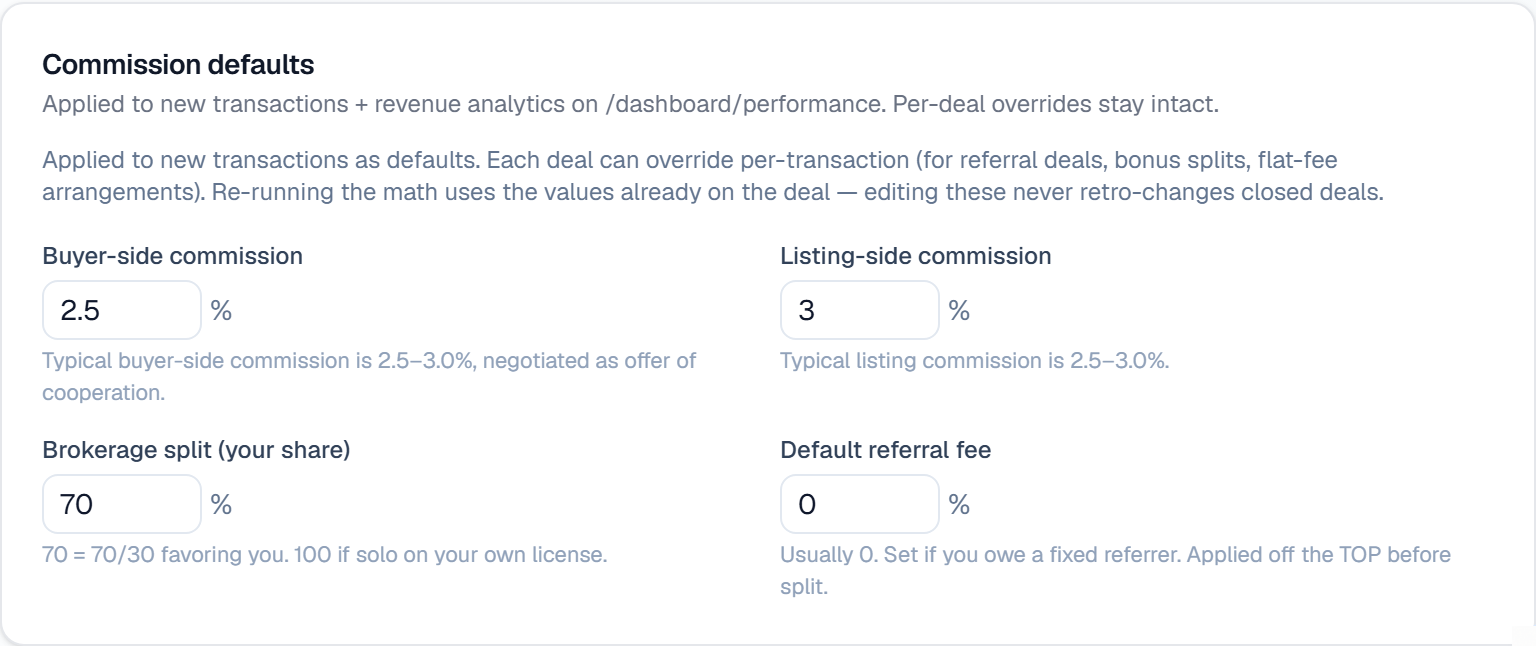
Set your Buyer-side commission and Listing-side commission. Both are typically 2.5–3.0%; the buyer side is negotiated as an offer of cooperation.
Set Brokerage split (your share) — the portion you keep. 70 means a 70/30 split in your favor; use 100 if you are solo on your own license.
Set a Default referral fee if you owe a fixed referrer. Note that it comes off the TOP, before your brokerage split is applied — leave it at 0 if you do not owe one.
Save. Any individual deal can still override all four, for referral deals, bonus splits or flat-fee arrangements.
What it looks like
Related
Need help with something else? Browse all guides or email support.
